Transaction Item Details Report
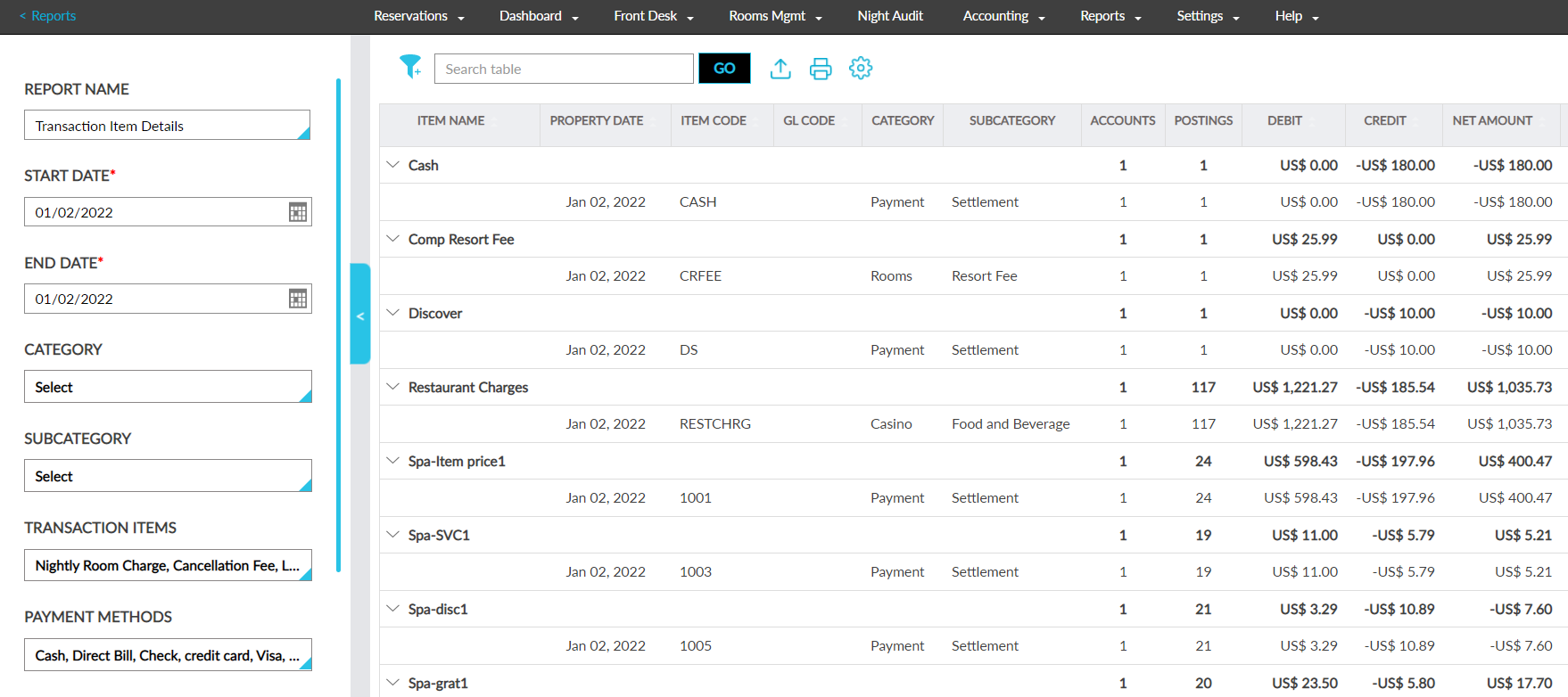
The Transaction Item Details report allows users to view a list of all items and settlements made to guest accounts. It also displays information about the various accounts to which the charges were posted using an item.
Perform the following steps to generate the report:
Navigate to Reports ➜ Dynamic Reports ➜ Accounting ➜ Transaction Item Details report.
Refer to the following table and fill in the fields.
|
Field |
Description |
|---|---|
|
Report Name |
Tax Postings. |
|
Start Date |
The start date for report generation. This is a mandatory field that displays the current property date by default. Users can select past or future dates. |
|
End Date |
The end date for report generation. This is a mandatory field that displays the current property date by default. Users can select past or future dates. |
|
Category |
This is an optional multi-select drop-down list that allows users to select the categories associated with the items. |
|
Subcategory |
This is an optional multi-select drop-down list that allows users to select the subcategories associated with the items. |
|
Transaction Items |
This is an optional multi-select drop-down list that allows users to select the transaction items to be included in the report. |
|
Payment Methods |
This is an optional multi-select drop-down list that allows users to select the payment methods available at the property. |
|
Display Ledger Balances |
When selected the ledger balances are displayed in the report. |
|
Above Property Payment |
This is an optional multi-select drop-down list that allows users to select whether the above property payments should be included in the report. The following options are displayed:
|
Click Run to generate the report.
Click Save to save the report under User Favorites section.
Sample Report
Report Fields
This report displays the following fields:
|
Field |
Description |
|---|---|
|
Item Name |
The item posted to the account. This column can be filtered and sorted. |
|
Property Date |
The current property date is displayed with an accordion. When the accordion is expanded, the accounts to which the item is posted are displayed. This column can be sorted. |
|
Item Code |
The code of the item posted. This column can be filtered and sorted. |
|
Category |
The category associated with the item. This column can be filtered. |
|
Subcategory |
The subcategory associated with the item. This column can be filtered. |
|
Accounts |
The total number of accounts (group, reservation, A/R account and house account) to which the selected transaction item has been posted to. This column can be filtered. |
|
Postings |
The total number of times the selected transaction item has been posted to the accounts. This column can be filtered. |
|
Acct |
This column displays the account ID (reservation confirmation ID, house account number, A/R account number, group code) of the account to which the posting was done. This column can be filtered. |
|
GL Code |
The GL code of the item. This column can be filtered and sorted. |
|
Above Property Payment |
The above property payment made for the item. This column can be filtered and sorted. |
|
Guest Name |
The guest name associated with the reservation to which the posting was done. |
|
Folio |
The name of the folio to which the posting was done. |
|
Debit |
The payment made for the item from the account. This column can be filtered and sorted. |
|
Credit |
The credit amount posted for the item. This column can be filtered and sorted. |
|
Net Amount |
The net amount for the posted item calculated as follows: Debit - Credit. This column can be filtered and sorted. |
|
Tax Amount |
The tax amount posted for the item. This column can be filtered and sorted. |
|
Gross Amount |
The gross amount for the posted item calculated as follows: Net Amount + Tax Amount. This column can be filtered and sorted. |
|
Room Revenue |
Indicates whether the item posted is marked as room revenue. This column can be filtered. |
|
System Configuration Only |
Indicates whether the posted item is marked as system configuration only. This column can be filtered. |
|
Allow Comp |
Indicated whether the posted item is marked as allow comp. This column can be filtered. |